
How to Track Monthly Expenses USA 2025 || Explain

Introduction: Why Tracking Expenses is a Game-Changer
Have you ever wondered: “Where did all my money go this month?” If so, you’re not alone. Millions of Americans struggle with overspending and living paycheck to paycheck.
The truth is, managing money isn’t about how much you make—it’s about how you track and use what you have. That’s why knowing how to track monthly expenses USA style is one of the most powerful financial habits you can build.
In this guide, we’ll cover:
- Why expense tracking matters in the USA
- Step-by-step methods to track monthly expenses
- Real-life examples with charts and graphs
- Best apps and tools for Americans
- FAQs, pros & cons, and practical money-saving tips
By the end, you’ll be ready to track, save, and finally feel in control of your finances.
Why Track Monthly Expenses in the USA?
1. Stop Living Paycheck to Paycheck
👉 Nearly 63% of Americans live paycheck to paycheck. Tracking shows where your money leaks are.
2. Build Better Saving Habits
👉 If you don’t measure it, you can’t improve it. Tracking expenses helps you redirect money into savings.
3. Reduce Debt Faster
👉 Identifying overspending allows you to throw extra cash at credit cards or loans.
4. Achieve Goals
👉 Whether it’s saving for a car, a home, or retirement—tracking makes sure your money works for you.
How to Track Monthly Expenses USA (Step-by-Step)
Step 1 – Record All Income
List every income source:
- Salary (after tax)
- Side hustles
- Freelancing
- Passive income
Step 2 – Collect All Bills & Receipts
Fixed bills: Rent, utilities, insurance
Variable: Groceries, fuel, dining out, subscriptions
Step 3 – Categorize Expenses
Common categories:
- Housing
- Food & Groceries
- Transportation
- Entertainment
- Debt payments
- Savings
Step 4 – Use a Tracker (App or Spreadsheet)
You can:
- Use budgeting apps (Mint, YNAB, EveryDollar)
- Use Google Sheets/Excel for manual tracking
Step 5 – Analyze with Charts
Visuals like pie charts and bar graphs make it easy to see spending habits.
Step 6 – Adjust & Improve
Cut back on non-essentials, reallocate funds to savings, and set new goals.
Example – Monthly Expense Breakdown (USA Household)
Let’s look at an example of a family in California with $5,000 monthly income.
Expenses:
- Housing: $1,800
- Utilities: $250
- Groceries: $600
- Transportation: $400
- Healthcare: $300
- Debt Payments: $500
- Entertainment: $250
- Savings: $500
- Miscellaneous: $400
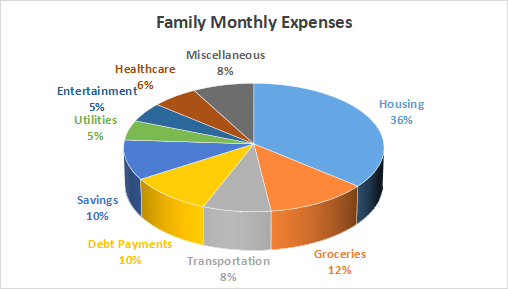
Pie Chart Example: Family Monthly Expense
How it looks visually:
- Housing – 36%
- Groceries – 12%
- Transportation – 8%
- Debt Payments – 10%
- Savings – 10%
- Utilities – 5%
- Entertainment – 5%
- Healthcare – 6%
- Miscellaneous – 8%
👉 A pie chart instantly shows that housing takes the biggest share of income, while savings and debt repayment need improvement.
Bar Graph Example: Expense vs. Income
Bar Chart Idea (Month of March):
- Income: $5,000
- Expenses: $4,500
- Savings: $500
This shows the family is saving only 10% of income—room for improvement.
Best Tools to Track Expenses in the USA
1. Budgeting Apps
- Mint (Free) – syncs with bank accounts
- YNAB (Paid) – zero-based budgeting
- PocketGuard – tracks spending limits
2. Spreadsheets
Google Sheets or Excel with formulas to auto-calculate totals.
3. Manual Tracking (Notebooks/Envelopes)
Great for people who prefer pen-and-paper.
4. Bank Mobile Apps
Most banks in the USA now show expense breakdowns by category.
Real-Life Story – Jake’s Transformation
Jake, a 28-year-old from Texas, used to overspend on eating out. After using a monthly expense tracker USA for 3 months, he discovered he spent $450/month on dining out. By cutting it to $200, he saved $3,000 in a year—which he used to pay off credit card debt.
Pros & Cons of Tracking Monthly Expenses
Pros:
- Builds financial awareness
- Reduces stress about money
- Helps cut unnecessary costs
- Encourages saving
Cons:
- Requires discipline
- Time-consuming if manual
- Can feel restrictive at first
Tips to Make Expense Tracking Easy
- Automate expense tracking with apps
- Set weekly reminders to review spending
- Use color coding in spreadsheets
- Create spending limits per category
- Reward yourself when you stick to your plan
FAQs – Track Expenses USA
Q1: What’s the easiest way to track monthly expenses in the USA?
👉 Using a free app like Mint or a simple Google Sheets template.
Q2: How much should Americans save monthly?
👉 Ideally 15–20% of income, but even 5% is better than none.
Q3: Should I track daily or monthly expenses?
👉 Daily tracking gives detail, but monthly tracking shows the big picture. Do both if possible.
Q4: Can tracking expenses help reduce debt?
👉 Yes, by identifying spending leaks and redirecting extra money to debt payoff.
Q5: Is it better to track manually or digitally?
👉 Depends on preference. Apps are faster, but manual tracking builds stronger awareness.
Conclusion: Start Tracking, Start Winning
Learning how to track monthly expenses USA style isn’t about restriction—it’s about freedom. When you know where your money goes:
- You feel in control
- You cut unnecessary costs
- You save for your dreams
- You build long-term financial security
👉 Start simple. Download a free app, create a spreadsheet, or even use pen and paper. Track your spending this month and create your own expense pie chart. You’ll be surprised at what you find—and motivated to make smarter choices.


You May Also Like
Weekly Budget Planner USA (2025 Complete Guide)
Cash Envelope Budgeting System USA 2026: How to Take Back Control of Your Money